



Client Command Editor
The Client Command Editor is used to create Client Commands and edit existing ones. The editor is divided into different sections.
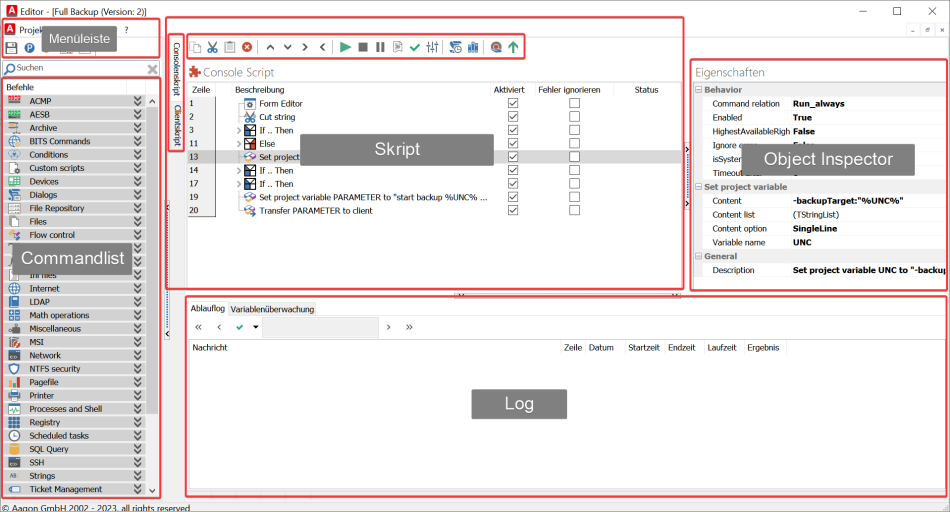
Client Command Editor
Menu Bar
In the menu bar of the Client Command Editor, you'll find some basic settings for the editor itself, as well as for the current Client Command.
Command List
The Command List contains all available functions for creating a Client Command. These are generally organized into categories but can also be displayed as a list. To use a function, simply drag it into the script.
Script
In this part of the editor, you can create a new command or edit an existing one. To do so, simply drag functions from the Command List into this field.
In the Script area, you’ll find two vertical tabs; the top tab contains the command for the console, and the bottom tab contains the command for the client.
Object Inspector
The Object Inspector is part of the Script area, as the value pairs are displayed when a command is selected in the script. The values displayed are the same ones that can be set via a command’s user interface.
Log
The Log is divided into two sections. The Run Log records and provides an overview of all variable actions performed during debugging. This makes it relatively easy to find errors in the command. In the Variable Monitor, you can view a list of the variables used by the command, including their current value and the two most recent values.