


UEFI Secure Boot
and verifies its signature using the distribution certificates embedded in the Shim package.
For systems with UEFI firmware and Secure Boot activated, the PXE boot process differs fundamentally from classic legacy boot via BIOS. UEFI uses a modern architecture model based on 64-bit operation, modular expandability and cryptographic verification. While legacy boot loads arbitrary code without integrity checks, Secure Boot enforces a continuous chain of trust that extends from the firmware starter to the kernel. Each component must be digitally signed in order to be executed.
To boot a system with Secure Boot activated via PXE, a boot file signed by Microsoft is required. This file, known as the Shim bootloader, is provided by the respective Linux distribution and forms the bridge between the UEFI firmware and the actual bootloader (usually GRUB).
Since the Shim bootloader is signed by Microsoft, it is classified as trustworthy by the firmware. The Shim package also contains certificates for the respective distribution, which are used to verify the subsequent components (such as GRUB, the kernel and the initramfs). It is crucial that the certificate chain remains unchanged throughout the entire boot process so that each component is only loaded from an authorized source.
PXE boot process in UEFI mode
The process typically proceeds as follows:
- UEFI firmware initialisation
The firmware initialises hardware components and checks whether Secure Boot is active. It then starts the network stack for PXE boot. - DHCP request and boot file assignment
The PXE client sends a DHCP request and receives the IP address, boot server (TFTP/HTTP) and the name of the boot file to be loaded, typically bootx64.efi. - Shim start (Microsoft signed)
The firmware loads bootx64.efi (the Shim bootloader). Since this is signed by Microsoft, it is accepted as trustworthy. - GRUB boot (Distribution signed)
The Shim bootloader loads grubx64.efi and verifies its signature using the distribution certificates embedded in the Shim package. - Kernel and initramfs start
GRUB loads the kernel (vmlinuz) and the initramfsd (initrd.img). Both must be signed, otherwise Secure Boot will deny access to the boot process. - System start and key verification
Only when all signatures are valid will the kernel be executed and the operating system booted.
This architecture ensures that only verified and signed components are executed during the entire boot process.
Preparation of the boot files
For PXE booting under Secure Boot, you need the following files, which are provided by the respective distribution:
- bootx64.efi – Shim bootloader (Microsoft signed, from the shim-signed package)
- grubx64.efi – GRUB EFI bootloader (distribution signed)
- vmlinuz – Linux kernel (signed)
- initrd.img – Initial RAM disk (signed)
These files are usually stored in the /tftpboot/ directory or a subfolder such as /tftpboot/uefi/ and deployed via DHCP/TFTP.
Example structure
├── bootx64.efi
├── grubx64.efi
├── grub.cfg
├── myDistro
├──── vmlinuz
└──── initrd.img
 Warning:
 GRUB configuration file
Unlike legacy boot, UEFI Secure Boot uses a GRUB configuration instead of PXELINUX files.
This configuration is usually stored in a file called grub.cfg, which is loaded by grubx64.efi.
Example structure of the GRUB configuration directory
└── grub.cfg
 Note:
Note: Important GRUB parameters:
- set timeout: Sets the timeout in seconds before the default entry is started
- menuentry: Defines a boot entry in the menu
- linuxefi: Loads the kernel (EFI-specific command)
- initrdefi: Loads the initramfs (EFI-specific command)
- set root: Defines the root file system or TFTP path
Example configuration (standard variant)
A simple GRUB configuration file for PXE boot with Secure Boot may look as follows:
set timeout=5
set color_normal=white/black
set menu_color_highlight=black/light-gray
menuentry "Boot from local disk" {
exit
}
menuentry "Rescue System (Secure Boot)" {
linuxefi /myDistro/vmlinuz root=/dev/ram0 rw
initrdefi /myDistro/initrd.img
}
This configuration offers two menu options:
- Start the rescue or installation system via kernel and initramfs
- Local boot process via ‘exit’ (transfers control to firmware)
If you now start from this configuration, you will see the following screen and the boot will start automatically from the local disk after 5 seconds.
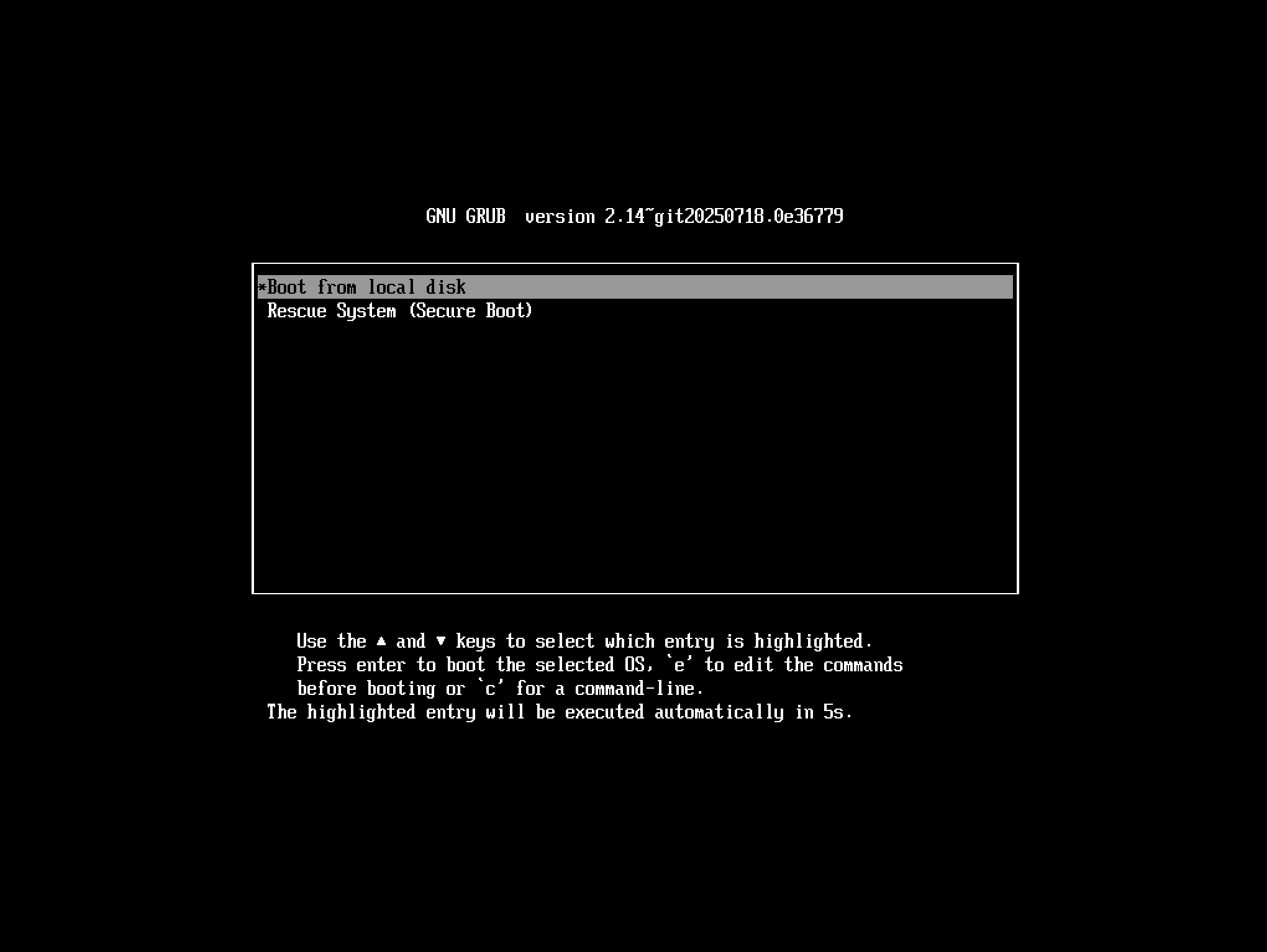
UEFI Boot screen
Note on Secure Boot in ACMP
The PXE boot system in ACMP supports Legacy BIOS, UEFI Boot and UEFI with Secure Boot.
However, functionality may be limited when Secure Boot is activated. For maximum compatibility, it is recommended to use a distribution with officially signed boot loaders (Shim + GRUB) or to disable Secure Boot.