



UEFI Secure Boot
and verifies its signature using the distribution certificates embedded in the Shim package.
For systems with UEFI firmware and Secure Boot activated, the PXE boot process differs fundamentally from classic legacy boot via BIOS. UEFI uses a modern architecture model based on 64-bit operation, modular expandability and cryptographic verification. While legacy boot loads arbitrary code without integrity checks, Secure Boot enforces a continuous chain of trust that extends from the firmware starter to the kernel. Each component must be digitally signed in order to be executed.
To boot a system with Secure Boot activated via PXE, a boot file signed by Microsoft is required. This file, known as the Shim bootloader, is provided by the respective Linux distribution and forms the bridge between the UEFI firmware and the actual bootloader (usually GRUB).
Since the Shim bootloader is signed by Microsoft, it is classified as trustworthy by the firmware. The Shim package also contains certificates for the respective distribution, which are used to verify the subsequent components (such as GRUB, the kernel and the initramfs). It is crucial that the certificate chain remains unchanged throughout the entire boot process so that each component is only loaded from an authorized source.
PXE boot process in UEFI mode
The process typically proceeds as follows:
- UEFI firmware initialisation
The firmware initialises hardware components and checks whether Secure Boot is active. It then starts the network stack for PXE boot. - DHCP request and boot file assignment
The PXE client sends a DHCP request and receives the IP address, boot server (TFTP/HTTP) and the name of the boot file to be loaded, typically bootx64.efi. - Shim start (Microsoft signed)
The firmware loads bootx64.efi (the Shim bootloader). Since this is signed by Microsoft, it is accepted as trustworthy. - GRUB boot (Distribution signed)
The Shim bootloader loads grubx64.efi and verifies its signature using the distribution certificates embedded in the Shim package. - Kernel and initramfs start
GRUB loads the kernel (vmlinuz) and the initramfsd (initrd.img). Both must be signed, otherwise Secure Boot will deny access to the boot process. - System start and key verification
Only when all signatures are valid will the kernel be executed and the operating system booted.
This architecture ensures that only verified and signed components are executed during the entire boot process.
Preparation of the boot files
For PXE booting under Secure Boot, you need the following files, which are provided by the respective distribution:
- bootx64.efi – Shim bootloader (Microsoft signed, from the shim-signed package)
- grubx64.efi – GRUB EFI bootloader (distribution signed)
- vmlinuz – Linux kernel (signed)
- initrd.img – Initial RAM disk (signed)
These files are usually stored in the /tftpboot/ directory or a subfolder such as /tftpboot/uefi/ and deployed via DHCP/TFTP.
Example structure
├── bootx64.efi
├── grubx64.efi
├── grub.cfg
├── myDistro
├──── vmlinuz
└──── initrd.img
 Warning:
 Anlage der GRUB-Konfiguration
Im Gegensatz zum Legacy-Boot verwendet Secure Boot über UEFI eine GRUB-Konfiguration anstelle der PXELINUX-Dateien.
Diese Konfiguration liegt üblicherweise in einer Datei namens grub.cfg, die von grubx64.efi geladen wird.
Beispielhafte Struktur des GRUB-Konfigurationsverzeichnisses
└── grub.cfg
 Note:
Note: Wichtige GRUB-Parameter:
- set timeout: Legt den Timeout in Sekunden fest, bevor der Standard-Eintrag gestartet wird
- menuentry: Definiert einen Boot-Eintrag im Menü
- linuxefi: Lädt den Kernel (EFI-spezifischer Befehl)
- initrdefi: Lädt die Initramfs (EFI-spezifischer Befehl)
- set root: Definiert das Root-Dateisystem oder den TFTP-Pfad
Beispielkonfiguration (Standard-Variante)
Eine einfache GRUB-Konfigurationsdatei für PXE-Start mit Secure Boot kann wie folgt aussehen:
set timeout=5
set color_normal=white/black
set menu_color_highlight=black/light-gray
menuentry "Boot from local disk" {
exit
}
menuentry "Rescue System (Secure Boot)" {
linuxefi /myDistro/vmlinuz root=/dev/ram0 rw
initrdefi /myDistro/initrd.img
}
Diese Konfiguration bietet zwei Menüoptionen:
- Start des Rescue- oder Installationssystems über Kernel und Initramfs
- Lokaler Bootvorgang über „exit“ (übergibt Kontrolle an Firmware)
Wenn Sie nun ausgehend von dieser Konfiguration starten, erhalten Sie die folgende Bildschirmansicht und der Boot würde nach 5 Sekunden automatisch von der lokalen Festplatte starten.
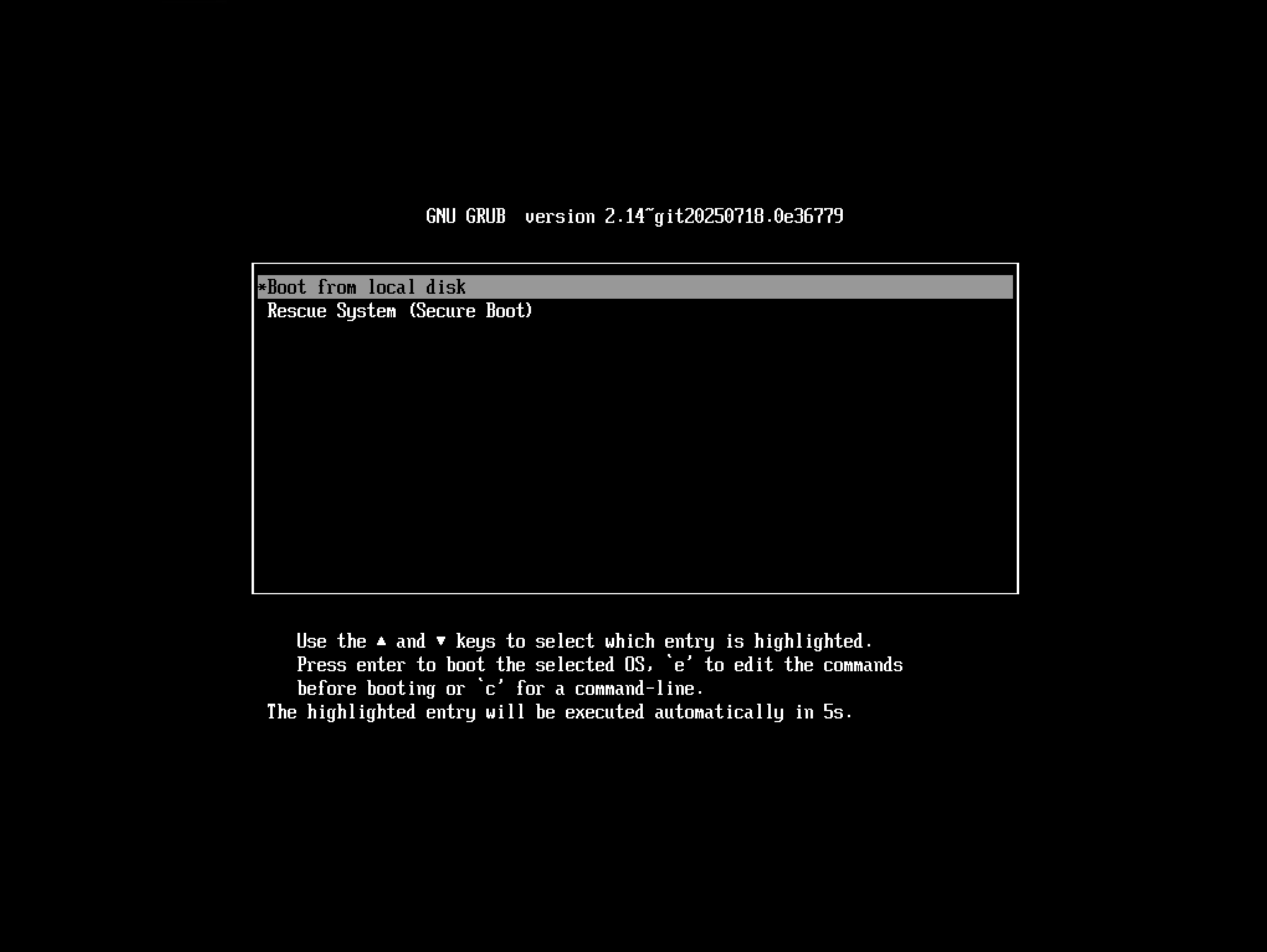
UEFI Boot Screen
Hinweis zum Secure Boot in ACMP
Das PXE-Boot-System in ACMP unterstützt sowohl Legacy-BIOS, UEFI Boot als auch UEFI mit Secure Boot.
Bei aktiviertem Secure Boot kann die Funktionalität jedoch eingeschränkt sein. Für maximale Kompatibilität wird empfohlen, eine Distribution mit offiziell signierten Bootloadern (Shim + GRUB) zu verwenden oder Secure Boot zu deaktivieren.